
One morning I woke up to two new positive replies from cold email. One person had already booked a call. The other wanted to see my website first.
I hadn't touched either of those emails. My outbound loop found the leads, checked their addresses, wrote the messages and sent the follow-ups on schedule. It does the same thing every day, whether I'm at my desk or asleep.
Here's how it works, and the parts I'd be careful with.
This post goes with my video "My AI GTM Loop Books Calls While I Sleep." The video shows the setup on screen. This has the details and the numbers.
Why cold email falls apart when you do it by hand
Cold email works. Doing it by hand is where it breaks.
The first problem is consistency. You send 50 emails on Monday, get busy with clients, and then nothing goes out for two weeks. Outbound only works if it keeps running.
Then there's the time. Finding the right owner or CEO and tracking down their email eats hours, and you haven't written anything yet.
Most people also skip checking the emails. They send to unverified lists, bounces climb, and the sending domain gets burned.
And follow-ups slip. Some people only answer the second email, and when you're doing everything yourself, the second email is the first thing you forget.
Every one of those is a consistency problem. Software is good at consistency. So I automated it.
The loop, step by step
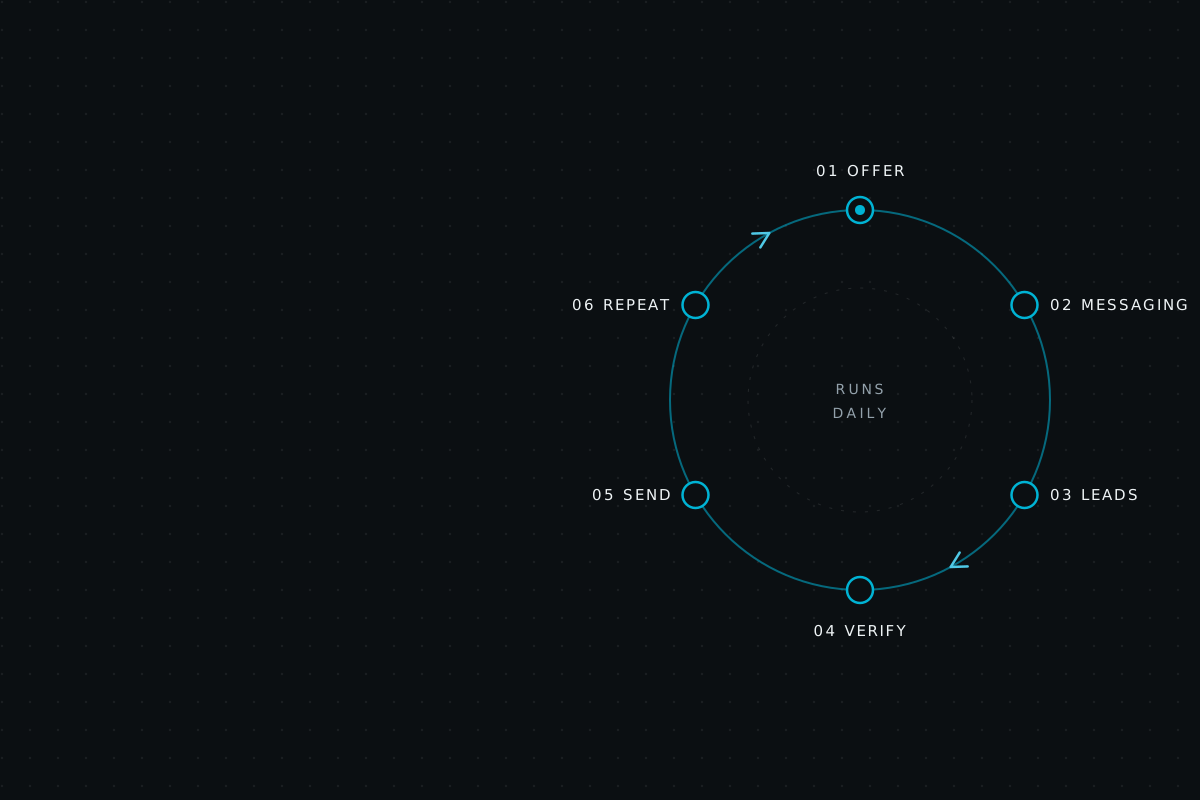
My outbound runs as a daily loop in Grok Bot, an AI assistant, hooked up to tools I already used. Six steps. Skip one and something specific breaks.
Step 1It knows the offer
Before it writes anything, the loop has to know what I sell, who I sell to and how I write. It learned all of that from my past emails.
Everything after this depends on it. When an AI doesn't get the offer, it fills the gap with vague, polished copy that nobody answers.
The "how I write" part gets skipped a lot, and it shouldn't. Prospects can spot a generic sales email in about one line. If the email sounds like the person they'd actually get on a call with, it reads like a note from a real founder.
The usual mistake is jumping straight to "write me cold emails." If you can't explain your offer in two sentences, the AI can't either.
Step 2It builds the messaging
Next it turns the offer into a short two-step sequence: a first email and one follow-up. Then it writes a version for each lead, so the email talks about that person's business.
Two steps is plenty. Short sequences are easy to test and easy to fix. I see people write five or six follow-ups, which just means more ways to annoy someone and more copy to keep up with.
Step 3It finds leads
The loop pulls owners and CEOs from GetLeads and scores each one on how well they fit the offer.
I sell to decision makers, so an email to someone who can't say yes is wasted. Scoring drops the bad fits before they cost me a send. Treating every contact in a database as a lead is how lists get big and campaigns get bad.
Step 4It verifies every email
Every address goes through MillionVerifier before it's used. No exceptions.
This is a real run I did on a GetLeads export:
MillionVerifier results, one GetLeads export
- Good
- Safe to send
- 3,011 (64%)
- Risky
- Including 927 catch-all addresses
- 978 (21%)
- Bad
- Would bounce
- 705 (15%)
The risky bucket is the sneaky one. A catch-all domain accepts mail for any address, so the verifier can't confirm the person actually exists. 927 of those 978 risky emails were catch-all.
Add risky and bad together and over a third of that list wasn't safe to send to. Skip verification and you're sending hundreds of emails to addresses that bounce or can't be confirmed. Do that enough and your domains get flagged. Then your emails stop showing up in inboxes, and nobody tells you.
That list came from a paid lead source, by the way. Paying for data doesn't make it clean. I verify every list, every time.
Step 5It sends from a separate inbox pool
The emails go out through Instantly, from a pool of inboxes I set up just for cold email. Never my main domain. The sending gets spread across the pool, so no single inbox carries all the volume. Follow-ups go out on their own and stop as soon as someone replies.
My main domain is where client email and invoices live. I'm not risking that on cold outreach, so the sending inboxes are walled off from it.
The auto-stop matters too. Nobody should get a "just bumping this" email after they've already booked.
Sending from your company domain is tempting because it's easier to set up. It is easier, right up until it isn't.
Step 6It runs again tomorrow
This is the step that makes the other five worth building. Every day the loop finds new leads, verifies them, writes to them and sends, whether I'm busy or not.
It runs on top of the rest of my go-to-market. I still post content and work with clients. The loop just keeps outbound from going quiet when I get busy.
A good email sent once is a nice moment. Decent emails sent to the right people every single day turn into a pipeline.
Where most people go wrong: they run one big campaign, get mediocre results and quit. Outbound pays off when it keeps going.
What the numbers look like
A recent Instantly campaign aimed at MSP and IT companies produced about 1 opportunity for every 122 emails sent. It used the two-step sequence. Step one had three variants (A, B and C), then a three-day wait, then the follow-up.
That rate is the reason I run this as a loop. When emails go out every day, 1 in 122 adds up to opportunities I can count on each month.
Across SS Growth Automation's work, we've helped 12+ companies and generated $150K+ in pipeline. In one campaign, about 1,300 leads turned into 44 opportunities.
Those two campaigns landed in different places, and that's normal. The offer and the market change the result, and so does how much you've tested. Automation keeps the work going every day. Getting the offer and the targeting right is still on you.
What I wouldn't automate
I try to be honest about what to skip. Here's where I'd be careful.
Deliverability comes first
If your emails land in spam, nothing else matters. Use separate sending inboxes and verify every list. Don't push volume before the setup is ready. An AI writing great emails into a burned domain is writing great emails nobody reads.
AI can't fix a fuzzy offer
If your offer is unclear, the loop just sends unclear emails faster. Figure out who you help and why they'd care. Then automate.
Replies are mine
When someone writes back interested, I take it from there. The loop's job is to start conversations. Closing them is on me.
What you need to set this up
The stack behind my loop:
- Grok BotRuns the loop. It learns the offer, writes the messaging, scores leads and handles the daily steps.
- GetLeadsFor owners and CEOs.
- MillionVerifierOn every list before anything sends.
- InstantlyFor sending. It runs the inbox pool and stops follow-ups when someone replies.
- Sending inboxesKept separate from your main domain.
- A clear offerWithout it, none of the tools above help.
You can wire this up yourself. Buying the tools is easy. Getting them to run together every day without breaking is the real work.